Exploring Linux & NVIDIA Drivers
NVIDIA Linux Drivers Internals Basics
Introduction
In this post we will talk about nvidia’s open source linux drivers internals and basic concepts. Back in 2022, NVIDIA released its drivers as open source, and for the security and tech community in general, this is good news; this allows us to understand and audit its software and its whole ecosystem especially for Linux; NVIDIA has had some issues with Linux distros and community.
Before this open sourcing, the community created its own open source drivers for Linux to resolve issues: https://nouveau.freedesktop.org/, and continues to contribute.
That said, not everything is open sourced though; NVIDIA keeps its secret recipes to itself which is understandable. The core of the drivers is moved into the GPU itself, which is running closed source firmware in a RISC-V processor.
The firmware can be found in: /lib/firmware/nvidia/<version>
					$ # /lib/firmware/nvidia/<version>
$ ls /lib/firmware/nvidia/580.126.09
gsp_ga10x.bin  gsp_tu10x.bin
Or by downloading the release of a specific version:
NVIDIA-Linux-x86_64-<version>/firmwarelib/firmware
Open source repo layout:
					open-gpu-kernel-modules/
├── Makefile / utils.mk / version.mk
├── kernel-open/                        Linux kernel module sources
│   ├── common/inc/                     shared headers (types, ioctls, platform)
│   ├── nvidia/                         Core GPU driver
│   ├── nvidia-uvm/                     Unified Virtual Memory
│   ├── nvidia-drm/                     DRM/KMS display
│   ├── nvidia-modeset/                 Modeset bridge
│   ├── nvidia-peermem/                 RDMA peer-memory
│   ├── Kbuild                          Main kernel build config
│   └── conftest.sh                     Kernel feature detection
├── src/                                OS-agnostic precompiled binaries
│   ├── nvidia/                         nv-kernel.o (core RM binary)
│   └── nvidia-modeset/                 nv-modeset-kernel.o (NVKMS binary)
└── nouveau/                            Nouveau driver bridge files
The driver stack produces five loadable kernel modules and each serves a distinct role in the GPU subsystem.
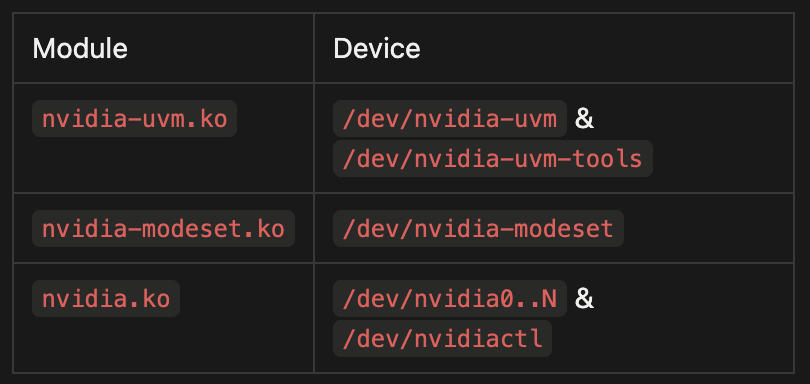
These devices and their IOCTLs are accessible to unprivileged users which constitutes LPEs and Container escape risks.
Let’s go over these drivers one by one:
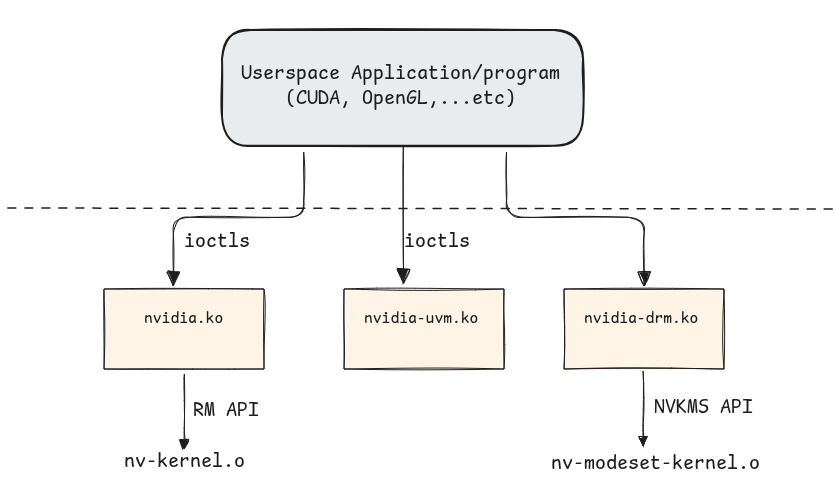
1. nvidia.ko - Core GPU Driver:
nvidia.ko is the core GPU driver and the only module in the stack that talks directly to the PCIe device. It owns the GPU’s lifecycle from boot to teardown: it registers a PCI driver that probes each card, maps the BARs & manages runtime power transitions. On top of that, it exposes the userspace devices, /dev/nvidia0..N (one per GPU) and /dev/nvidiactl .
The main entry file is nv.c in which:
It first initializes procfs entries:
					static int __init nvidia_init_module(void)
{
		// [...]
    rc = nv_procfs_init();
    if (rc < 0)
    {
This then creates /proc/driver/nvidia/* entries, like /proc/driver/nvidia/params & /proc/driver/nvidia/gpus/* …etc. It creates slub caches: nvidia_stack_t_cache & nvidia_p2p_page_t_cache and initializes NV link drivers.
It brings up UVM :
					// [...]
#if defined(NV_UVM_ENABLE)
    rc = nv_uvm_init();
    if (rc != 0)
    {
        goto module_exit;
    }
#endif
// [...]
Then it registers the PCI drivers for each PCI-capable GPU unit:
					tatic int __init
nv_drivers_init(void)
{
    int rc;

    rc = nv_pci_register_driver();
    // [...]
}


// nv-pcic.c


struct pci_driver nv_pci_driver = {
    .name      = MODULE_NAME,
    .id_table  = nv_pci_table,
    .probe     = nv_pci_probe,
    .remove    = nv_pci_remove,
    .shutdown  = nv_pci_shutdown,
#if defined(NV_USE_VFIO_PCI_CORE) && \
  defined(NV_PCI_DRIVER_HAS_DRIVER_MANAGED_DMA)
    .driver_managed_dma = NV_TRUE,
#endif
#if defined(CONFIG_PM)
    .driver.pm = &nv_pm_ops,
#endif
    .driver.probe_type = PROBE_FORCE_SYNCHRONOUS,
};

// [...]

int nv_pci_register_driver(void)
{
    if (NVreg_RegisterPCIDriver == 0)
    {
        return 0;
    }
    return pci_register_driver(&nv_pci_driver);
}
Then registers devices /dev/nvidia0…N (For devices 0 to N, depending the number of them) and /dev/nvidiactl:
					static int __init nvidia_init_module(void)
{
		// [...]
    rc = nv_register_chrdev(0, NV_MINOR_DEVICE_NUMBER_REGULAR_MAX + 1,
            &nv_linux_devices_cdev, "nvidia", &nvidia_fops);
    if (rc < 0)
    {
        goto drivers_exit;
    }

    rc = nv_register_chrdev(NV_MINOR_DEVICE_NUMBER_CONTROL_DEVICE, 1,
            &nv_linux_control_device_cdev, "nvidiactl", &nvidia_fops);
    if (rc < 0)
    {
        goto partial_chrdev_exit;
    }
    // [...]

}
Once all these and other initializations are done, it exposes functions & IOCTLs to so that userspace apps can interact with the GPU:
					/* character device entry points*/
static struct file_operations nvidia_fops = {
    .owner     = THIS_MODULE,
    .poll      = nvidia_poll,
    .unlocked_ioctl = nvidia_unlocked_ioctl, // [1]
#if NVCPU_IS_X86_64 || NVCPU_IS_AARCH64
    .compat_ioctl = nvidia_unlocked_ioctl,
#endif
    .mmap      = nvidia_mmap, // [2]
    .open      = nvidia_open, // [3]
    .release   = nvidia_close, // [4]
};
[1] is for handling IOCTLs, [2] is for mapping GPUs memory into userspace, [3] is for device opening, and [4] is for closing the device.
Let’s focus on IOCTLs:
					long nvidia_unlocked_ioctl(
    struct file *file,
    unsigned int cmd,
    unsigned long i_arg
)
{
    return nvidia_ioctl(NV_FILE_INODE(file), file, cmd, i_arg);
}
Here’s a list of some of them:
					NV_ESC_QUERY_DEVICE_INTR   -> Status Getter
NV_ESC_CARD_INFO           -> GPU info (Vendor, bus, device_id, ...etc)
NV_ESC_ATTACH_GPUS_TO_FD   -> Attaching GPUs to this ioctl-called FD
NV_ESC_CHECK_VERSION_STR   -> Version checking
NV_ESC_SYS_PARAMS          -> System parameters
NV_ESC_NUMA_INFO           -> Getter for NUMA info
NV_ESC_SET_NUMA_STATUS     -> Getter NUMA Status
NV_ESC_EXPORT_TO_DMABUF_FD -> Dma-buf export
Everything not in this short list goes in, where function rm_ioctl() handles many other IOCTLs:
					default:
    rmStatus = rm_ioctl(sp, nv, &nvlfp->nvfp, arg_cmd, arg_copy, arg_size); // <--
    status   = ((rmStatus == NV_OK) ? 0 : -EINVAL);
    break;
Another important files is nv-mmap.c. As mentioned previously, nvidia.ko handles mapping operations and there are 4 different types of mappings using .mmap = nvidia_mmap, :
On device /dev/nvidiaN:
Type 1: BAR / Framebuffer mapping Maps the GPU’s PCIe BAR region into userspace.
Type 2: GPU-attached NUMA RAM
Maps NUMA RAM into userspace.
On device /dev/nvidiactl:
Type 3: P2P PCIe MMIO
Maps the MMIO region of another PCIe device into userspace. The point is to let two PCIe devices DMA to each other directly without bouncing through host system RAM
Type 4: DMA system memory
Maps pages allocated in system RAM with the kernel’s DMA APIs so the GPU can read and write them safely over PCIe.
2. nvidia-uvm.ko - Unified Virtual Memory
This is the largest module in terms of code base size, and it is kind of a second virtual memory subsystem layered on top of Linux’s, with its own VMA-equivalent objects and its own operations.
In the original CUDA programming model, the CPU and the GPU each had their own memory and their own pointers and for the GPU to see a userspace buffer (CPU) like a malloc’d one, we needed to copy bytes between this buffer and a cuda allocated buffer in the GPU using cudaMemcpy(), so 2 address spaces, 2 allocations. The Unified Memory, as its name suggests, unifies and reduces that into 1 allocation, 1 pointer, like in this template example:
					int *data;
cudaMallocManaged(&data, N * sizeof(int));   // 1 pointer allocation
for (int i = 0; i < N; i++) data[i] = i;     // CPU writes
my_kernel<<<...>>>(data, N);                  // GPU reads/writes
cudaDeviceSynchronize();
printf("%d\n", data[42]);                     // CPU reads back
The same virtual address data is valid on every CPU thread and on every GPU in the process and the user does not call cudaMemcpy(). So, all of that is thinks to nvidia-uvm.ko.
Concretely, to make a single virtual address work on both the CPU and the GPU, the driver has to:
- Reserve a virtual address range that is mirrored in both the process’s CPU page tables and the GPU’s page tables: i.e. Allocate a range where, say 0x7f1234567000 belongs to, in both the CPU and GPU, despite it being backed by different physical pages and handled by different MMUs.
- When the CPU touches a page that currently lives on the GPU, it takes a page fault since it doesn’t know the physical address(this page fault is handled by the UVM driver); The handler copies the page data from GPU VRAM into a newly allocated RAM page, update the CPU page table, and let the CPU access continue.
- When the GPU touches a page that currently lives on the CPU (or on a different GPU), it takes a GPU page fault (Same as the last case, since its MMU doesn’t have an entry of this CPU virtual address), the UVM handler copies the page over, updates the GPU’s page table, and tells the it to retry access.
Note: When a CPU accesses a virtual address that has been accessed(write) by the GPU, or vice versa, UVM invalidates the TLB and/or PTE of the first access, since this one may have changed the data.
So, we could think of it as both the CPU and the GPU are fighting over one or a set of shared virtual Addresses, and each time one needs to access it, the UVM handles the physical page migration for it.
Channels, pushes, pushbuffers :
We previously spoke about how there’s a need to update GPU’s page tables & TLB, allocate VAs Copy data…etc; the kernel and the drivers that are running on the machine’s CPU can not have access to the GPU’s own CPU(as mentionned previously, in NVIDIA it is a RISC-V processor). For the UVM driver to give the GPU commands, there’s a command submit queue called Pushbuffer.
Each time the driver / UVM wants to issue a command to the GPU, it creates the actual command and add it into the Pushbuffer, and the it creates an entry in the GPFIFO ring which contains the info about the address and various other info about the newly added command in the BP; after that, GP_PUT which points to the next frees slot in the GPFIFO is incremented and the GPU is notified by ringing a doorbell; this latter reads the GPFIFO entry, and increments the reading index GP_GET and then fetches the command and handles it in its own processor.
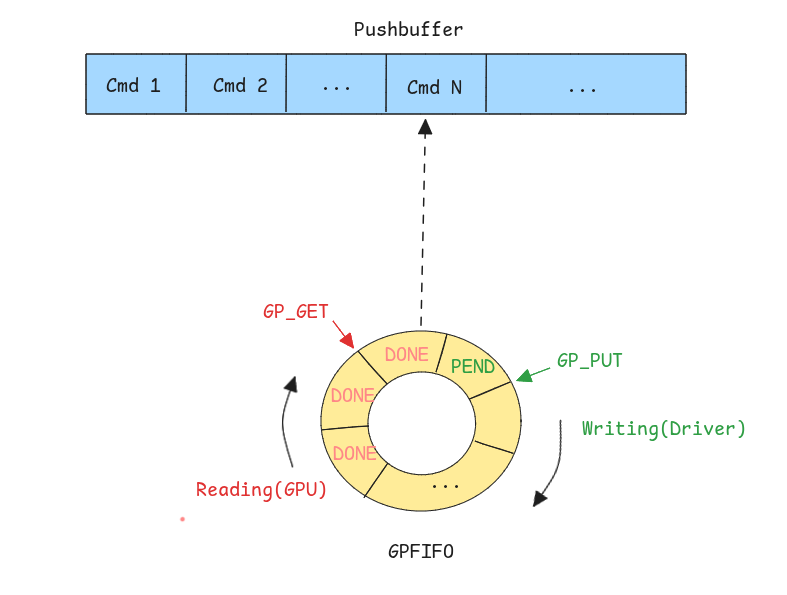
Note:
GP_PUT&GP_GETare stored in the GPU memory and each thread/task has a state Context that we call a Channel that holds its own pair of these values.
IOCTLs:
Unlike nvidia.ko, which forwards some ioctls to the closed RM blob, UVM ioctls are handled by open code in this tree, and they exposed exposed through /dev/nvidia-uvm :
					// kernel-open/nvidia-uvm/uvm.c
static long uvm_ioctl(struct file *filp, unsigned int cmd, unsigned long arg)
{
    switch (cmd)
    {
        case UVM_DEINITIALIZE:
            return 0;

        UVM_ROUTE_CMD_STACK_NO_INIT_CHECK(UVM_INITIALIZE,           uvm_api_initialize);
        UVM_ROUTE_CMD_STACK_NO_INIT_CHECK(UVM_MM_INITIALIZE,        uvm_api_mm_initialize);

        UVM_ROUTE_CMD_STACK_INIT_CHECK(UVM_PAGEABLE_MEM_ACCESS,     uvm_api_pageable_mem_access);
        UVM_ROUTE_CMD_STACK_INIT_CHECK(UVM_REGISTER_GPU,            uvm_api_register_gpu);
        UVM_ROUTE_CMD_STACK_INIT_CHECK(UVM_UNREGISTER_GPU,          uvm_api_unregister_gpu);
        UVM_ROUTE_CMD_STACK_INIT_CHECK(UVM_CREATE_RANGE_GROUP,      uvm_api_create_range_group);
        UVM_ROUTE_CMD_STACK_INIT_CHECK(UVM_ENABLE_PEER_ACCESS,      uvm_api_enable_peer_access);
        UVM_ROUTE_CMD_STACK_INIT_CHECK(UVM_CREATE_EXTERNAL_RANGE,   uvm_api_create_external_range);
        UVM_ROUTE_CMD_ALLOC_INIT_CHECK (UVM_MAP_EXTERNAL_ALLOCATION,uvm_api_map_external_allocation);
        UVM_ROUTE_CMD_STACK_INIT_CHECK(UVM_FREE,                    uvm_api_free);
        UVM_ROUTE_CMD_STACK_INIT_CHECK(UVM_REGISTER_GPU_VASPACE,    uvm_api_register_gpu_va_space);
        // [More IOCTLs]
    }
}
nvidia-uvm also exposes device /dev/nvidia-uvm-tools, which serves a debug tool to record events like page migrations, faulting and do debugging on UVM managed memory.
3. nvidia-drm.ko - Direct Rendering Manager:
This is the module that handles Displaying. It registers with the kernel’s DRM (Direct Rendering Manager) subsystem so that compositors like Xorg, Gnome…etc can talk to NVIDIA hardware through the same drm_mode_* ioctls they use for Intel or AMD.
The module presents itself to the kernel as a regular drm driver, with a mostly stock file_operations table and its own ioctl array, as stated in the official kernel doc, which is that drm drivers must define the file operations structure that forms the DRM userspace API entry point and must include functions are drm_open(),drm_read(), drm_ioctl(), drm_compat_ioctl(), [drm_read()](<https://www.kernel.org/doc/html/v4.18/gpu/drm-internals.html#c.drm_read>) and drm_poll():
					static const struct file_operations nv_drm_fops = {
      .owner          = THIS_MODULE,
      .open           = drm_open,
      .release        = drm_release,
      .unlocked_ioctl = nv_drm_ioctl,
      .mmap           = nv_drm_mmap,
      .poll           = drm_poll,
      .read           = drm_read,
      // [...]
  };

static struct drm_driver nv_drm_driver = {
      .ioctls     = nv_drm_ioctls,
      .num_ioctls = ARRAY_SIZE(nv_drm_ioctls),
      .fops       = &nv_drm_fops,
      // [...]
  };
Upon the driver’s initialization, devices /dev/dri/card* and /dev/dri/renderD* are created:
					/*
 * Helper function for allocate/register DRM device for given NVIDIA GPU ID.
 */
void nv_drm_register_drm_device(const struct NvKmsKapiGpuInfo *gpu_info)
{
    struct nv_drm_device *nv_dev = NULL;
    struct drm_device *dev = NULL;
    struct device *device = gpu_info->gpuInfo.os_device_ptr;
    bool bus_is_pci;
		// [...]

    /* Register DRM device to DRM sub-system */

    if (drm_dev_register(dev, 0) != 0) { // <------
        NV_DRM_DEV_LOG_ERR(nv_dev, "Failed to register device");
        goto failed_drm_register;
    }
    // [...]

}
On top of the generic DRM core, nvidia-drm.ko registers 24 driver-private DRM_NVIDIA_* ioctls covering three areas:
The first 1) is GEM buffer object management, GEM is DRM’s handle-based wrapper for GPU memory, and NVIDIA exposes three flavours: importing memory that NVKMS already owns, pinning userspace pages so the GPU can scan them out, and exporting
GEM handles as dma-buf fds so other drivers (cameras, NICs, other GPUs) can share the same physical pages.
					#define DRM_NVIDIA_GEM_IMPORT_NVKMS_MEMORY          0x01
#define DRM_NVIDIA_GEM_IMPORT_USERSPACE_MEMORY      0x02
#define DRM_NVIDIA_GEM_PRIME_FENCE_ATTACH           0x06
#define DRM_NVIDIA_GEM_EXPORT_NVKMS_MEMORY          0x09
#define DRM_NVIDIA_GEM_MAP_OFFSET                   0x0a
#define DRM_NVIDIA_GEM_ALLOC_NVKMS_MEMORY           0x0b
#define DRM_NVIDIA_GET_CRTC_CRC32_V2                0x0c
#define DRM_NVIDIA_GEM_EXPORT_DMABUF_MEMORY         0x0d
#define DRM_NVIDIA_GEM_IDENTIFY_OBJECT              0x0e
// [...]
The second 2) is fences for cross-device synchronisation, in two forms:
classic PRIME fences attached to a GEM object’s reservation, and the newer semaphore-surface fences (SEMSURF_*) which wrap NVKMS-backed semaphores as standard sync_file descriptors:
					#define DRM_NVIDIA_SEMSURF_FENCE_CTX_CREATE         0x14
#define DRM_NVIDIA_SEMSURF_FENCE_CREATE             0x15
#define DRM_NVIDIA_SEMSURF_FENCE_WAIT               0x16
#define DRM_NVIDIA_SEMSURF_FENCE_ATTACH             0x17
// [...]
The third 3) is the master-gated GRANT_PERMISSIONS ioctl, which lets the active compositor hand off modeset rights for a specific display to another fd:
					#define DRM_NVIDIA_GRANT_PERMISSIONS                0x12
#define DRM_NVIDIA_REVOKE_PERMISSIONS               0x13
// [...]
Security & Attack Surface:
The attack surface for Local Privilege Escalation is obviously all the IOCTLs and device file handlers that are reachable from unprivileged users; there has been many bugs in the past on the core driver & the display driver. Though, the most imminent ones are those on the drivers themselves (CPU-execution), and not on the GPU, since having an arbitrary r/w on the latter doesn’t guarantee full system r/w due to IOMMU isolation, although some users may choose to deactivate this feature for performance reasons. Hardware attacks are also a real attack surface, specifically the RowHammer which is a disturbance in DRAM with causes bit flips that could lead to sensitive data corruption; as of recently, a successful LPE has been demonstrated in this paper.
Closing words & What’s next:
The NVIDIA ecosystem is large and complex, and each part/component needs its own study and blog post; but in this post, i tried to give a big picture of these open source drivers functionality, and this opens up pathways to explore; there’s still many features to documents in these, but there’s also a huge part left to scrutinize on the GPU’s side, namely the GPU System Processor(GSP) internals & Secure Processor (SEC2) and their interactions with each other and with the CPU side drivers.
Mohand
About Us
FuzzingLabs was founded in 2021 by Patrick Ventuzelo, a vulnerability researcher who spent more than ten years finding the flaws hidden in firmware and binaries. He built FuzzingLabs to turn that passion into a company, and to teach it.
Today, FuzzingLabs is a French team of researchers and engineers. They compete at Pwn2Own, present at Black Hat and OffensiveCon, and pour that same passion into FuzzForge, the platform at the heart of the company.
Get Your Free Security Quote!
Let’s work together to ensure your peace of mind.
LATEST ARTICLES